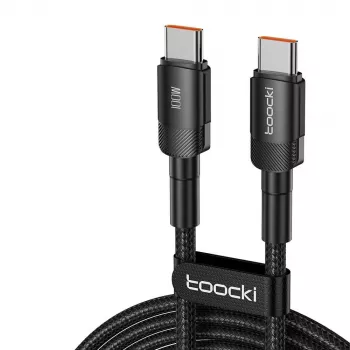
100W USB-C to USB-C Fast Charging Cable (PD 3.0 + QC 4.0, 5A): What It Does and How to Use It
A USB-C to USB-C fast charging cable rated up to 100W and 5A is built for modern phones, tablets, laptops, and power banks that support USB Power Delivery (PD) and compatible fast-charging modes like Quick Charge (QC). This guide explains what the ratings mean, what to expect with different devices and chargers, and how to avoid common charging slowdowns.
What “100W / 5A / PD 3.0 / QC 4.0” Means
Those specs are a shorthand for how much power the cable can safely carry and which fast-charging ecosystems it can work alongside. The key idea: a cable enables power transfer, but it doesn’t “push” power on its own—your charger and device decide what actually flows.
- 100W is the maximum power the cable can carry when paired with a compatible USB-C PD charger and device (commonly up to 20V × 5A).
- 5A indicates higher current capacity; for true 5A operation, many setups rely on an e-marked cable and a charger/device that negotiates 5A over USB-C PD.
- PD 3.0 is the USB-IF standard for negotiating charging voltage/current over USB-C (widely used by laptops, tablets, and many phones). Learn more from the official overview: USB-IF — USB Power Delivery.
- QC 4.0 is Qualcomm’s fast-charging family designed to be compatible with USB-C and often built around PD-style negotiation; real-world speed depends on the phone and charger support. Reference: Qualcomm — Quick Charge Technology.
- A high-wattage cable does not force power into a device; charging is negotiated and limited to what’s safe and supported.
Quick Compatibility Snapshot (Typical Outcomes)
| Device |
Charger |
Likely Result |
What to Check |
| USB-C laptop (PD) |
USB-C PD charger (65W–100W) |
Fast charge up to laptop’s max |
Laptop PD wattage need; charger wattage |
| Android phone (PD/QC) |
USB-C PD or QC charger |
Fast charge (varies by brand/model) |
Phone’s supported protocol; charger output profiles |
| iPad/USB-C tablet (PD) |
USB-C PD charger |
Fast charge (often 18W–45W) |
Tablet’s max PD input |
| Power bank (USB-C in/out) |
USB-C PD charger |
Faster bank recharge if PD supported |
Bank’s USB-C input rating |
| USB-C device (basic) |
Any USB-C charger |
Standard charge |
No fast-charge support = normal speed |
Where a 100W USB-C to USB-C Cable Helps Most
- Laptop charging: Supports higher power draw than basic cables, which matters for 45W/65W/90W-class USB-C laptops.
- High-load use cases: Helps reduce the chance of “charging but still losing battery” when a laptop is plugged in while running heavier tasks.
- Fewer cables to carry: One capable USB-C to USB-C cable can cover phone + tablet + laptop when matched with the right charger.
- Power banks with USB-C PD: Enables quicker recharging and higher output to devices that can accept it.
Getting the Fastest Charging Speed (Common Bottlenecks)
When charging feels slow, the cable is only one link in a three-part chain: charger, cable, and device. Any one of them can cap the speed.
PD vs QC vs USB-C: How They Relate
- USB-C is the connector shape and a set of capabilities; it doesn’t guarantee fast charging by itself. (Background: USB-IF — USB Type-C.)
- USB Power Delivery (PD) is a standardized method for negotiating higher power levels over USB-C.
- Quick Charge (QC) is a fast-charging ecosystem commonly found on Android devices; newer versions are designed to work well with USB-C and often align with PD-style negotiation.
- Real-world takeaway: Prioritize PD compatibility for broad coverage (phones, tablets, laptops), and treat QC support as a useful bonus for certain Android models.
Safety and Durability Basics to Look For
Using It with Popular Setups (Phones, Samsung, Laptops, Car Chargers)
Product Options Available
FAQ
What is the difference between USB-C and PD QC?
USB-C is the connector/port type, while PD (Power Delivery) is the standard that negotiates higher charging power over USB-C. QC (Quick Charge) is a fast-charging ecosystem commonly used on Android phones; actual speed depends on the combined support of the device, charger, and cable.
What is the best USB-C fast charging cable?
The best cable depends on what you’re charging: for laptops and high-power chargers, look for 100W support, 5A capability, and e-marking. For phones and smaller tablets, a well-built 60W or 100W cable can still be ideal—just match the length, durability, and the charger/device protocols you actually use.
What is the fast charging cable for Samsung charger Type-C?
For many Samsung fast-charging setups, a USB-C to USB-C cable paired with a compatible PD/PPS charger delivers the best results. The cable should support sufficient current (often 3A or 5A) and be in good condition, but the phone model and charger ultimately determine the maximum speed.
Recommended for you








Leave a comment