How to build a smart home security system?
Building a smart home security system starts with a simple plan: protect the most vulnerable entry points, add reliable detection, and make sure alerts reach you fast. The best setups combine a few core devices—smart cameras, door/window sensors, motion detectors, a video doorbell, and a smart lock—connected through a hub or app that keeps everything organized.
1) Map your priorities and entry points
Walk your home and list doors, ground-floor windows, garages, and backyards with limited visibility. Decide what matters most: deterring package theft, monitoring kids arriving home, or catching after-hours movement. This helps you buy devices with purpose instead of piling on gadgets.
2) Choose a platform and connectivity
Pick a primary ecosystem (such as Apple Home, Google Home, or Alexa) and confirm device compatibility before purchasing. For sensors, consider Zigbee or Z-Wave for solid reliability and battery life; for cameras, strong Wi‑Fi coverage (or wired Ethernet, if possible) is key. If your Wi‑Fi struggles at the edges of your home, add a mesh system before adding multiple cameras.
3) Start with foundational devices
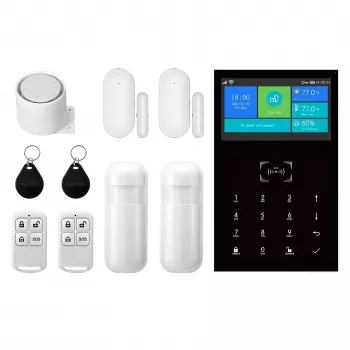
Begin with a video doorbell or front-entry camera, then add door/window contact sensors and a motion sensor for high-traffic areas. Smart locks can tighten access control, especially when paired with temporary codes or auto-lock rules. If you want loud deterrence, include a siren or an alarm base station.
4) Set up smart alerts and automations
Configure notifications so they’re useful—too many alerts get ignored. Create automations like “arm when everyone leaves,” “turn on exterior lights when motion is detected,” and “record when a door opens after 10 p.m.” Add two-factor authentication to your accounts and keep device firmware updated.
5) Test, adjust, and maintain
Test sensors weekly at first: open windows, walk past motion zones, and verify you receive notifications. Fine-tune camera angles to avoid glare and busy streets, and check batteries on a schedule. A great system evolves as your routines change.
For a detailed walkthrough, device suggestions, and setup tips, visit the complete guide on building a smart home security system.
FAQ
Do smart home security systems work without a subscription?
Yes, many devices work without a monthly plan for basic live viewing, local storage, or app alerts. Subscriptions typically add cloud recording, extended video history, and advanced detection features.
Recommended for you













Leave a comment